显示标签为“Windows”的博文。显示所有博文

2012年6月6日星期三

Windows 8 Release Preview Available: Download Links Live

If you are dying to test a new snapshot of Microsoft’s upcoming operating system Windows 8 your chance has come to do just that. Microsoft has just enabled the downloads of the Windows 8 Release Preview, which could be the last public preview version of the operating system before release.

The preview version of the operating system is as usually available in form of the Windows 8 Upgrade Assistant which you can use to upgrade an existing system, for instance the Windows 8 Consumer Preview or Windows 7, to the Windows 8 Release Preview, and as ISO images that you can burn on CD, install in a virtual machine or install from USB Flash Drives.

windows 8 consumer preview

Interested users find the Upgrade Advisor download on this page over at the official Microsoft website, and the download links for all 32-bit and 64-bit ISO versions of the operating system below.The upgrade advisor download seems to be faster than the ISO downloads. While I do not have scientific proof to back that up, I compared downloads several times and the Upgrade Advisor download always finished before the ISO download.

The Windows 8 product key for all versions is always the same:? TK8TP-9JN6P-7X7WW-RFFTV-B7QPF

64-bit (x64)????????????????????Download (3.3 GB)????????????????????Sha 1 hash — 0xD76AD96773615E8C504F63564AF749469CFCCD5732-bit (x86)????????????????????Download (2.5 GB)????????????????????Sha 1 hash — 0x8BED436F0959E7120A44BF7C29FF0AA962BDEFC964-bit (x64)????????????????????Download (3.3 GB)????????????????????Sha 1 hash — 0x0C07A0501840517AE789B4EA82EDE061F4E42CE932-bit (x86)????????????????????Download (2.5 GB)????????????????????Sha 1 hash — 0x95B8948DB8AF1559B03ADA5A85B7987CFD456544

Chinese (Simplified)

64-bit (x64)????????????????????Download (3.4 GB)????????????????????Sha 1 hash — 0xC21B69413E08FCFB756EEDB2B99D0C0472486D1C32-bit (x86)????????????????????Download (2.6 GB)????????????????????Sha 1 hash — 0xF9FAF5910275832EA03F630CD5803565C03C8F3164-bit (x64)????????????????????Download (3.4 GB)????????????????????Sha 1 hash — 0x1556802DEA81A7B3E3159E99F911C1C855B20B2432-bit (x86)????????????????????Download (2.6 GB)????????????????????Sha 1 hash — 0xC617D24A48E5A5A2329CBA5DED2B08EBB7463FD064-bit (x64)????????????????????Download (3.3 GB)????????????????????Sha 1 hash — 0x132ED51FAD11EF626BD330288822D68603C5C56032-bit (x86)????????????????????Download (2.5 GB)????????????????????Sha 1 hash — 0x2F434DDD06ADDD38A972E3E71CA059BD9A4416CD64-bit (x64)????????????????????Download (3.3 GB)????????????????????Sha 1 hash — 0xC0117244B5E018BBF01F6242BF9020D27918A12F32-bit (x86)????????????????????Download (2.5 GB)????????????????????Sha 1 hash — 0x019E239D0990B8C04505F5248DDBD067FC3CAF4264-bit (x64)????????????????????Download (3.3 GB)????????????????????Sha 1 hash — 0x6393BA8BC2DD3CBD7B55D00B9D9587843BDB05CD32-bit (x86)????????????????????Download (2.5 GB)????????????????????Sha 1 hash — 0xE28666272702351491CCB713DC66E064D88BA99464-bit (x64)????????????????????Download (3.3 GB)????????????????????Sha 1 hash — 0xC4CFD5F2DD54CDC44FCFE5D69122931DEDA57DF632-bit (x86)????????????????????Download (2.5 GB)????????????????????Sha 1 hash — 0xB605E1428852503C0E7E3490815E96A3101F2C5564-bit (x64)????????????????????Download (3.3 GB)????????????????????Sha 1 hash — 0x90B07E56008FAB64AD9CA47F86CC6D99150FBF8A32-bit (x86)????????????????????Download (2.5 GB)????????????????????Sha 1 hash — 0x91AE86FACBBC4D6FAFED0239D15542C28F37827D64-bit (x64)????????????????????Download (3.3 GB)????????????????????Sha 1 hash — 0x10F9F738593BC740561DA8AB247F5CEF3ABA65BB32-bit (x86)????????????????????Download (2.5 GB)????????????????????Sha 1 hash — 0x7A473B0D7F5DB3E949915D2A2F361FAE92A5253864-bit (x64)????????????????????Download (3.3 GB)????????????????????Sha 1 hash — 0x6E6C4B9D5788BF2BF72E1AC8F1F1D6FA0241311C32-bit (x86)????????????????????Download (2.5 GB)????????????????????Sha 1 hash — 0x533CA552681DFC9F347633F2BA1B5224BEF22EB364-bit (x64)????????????????????Download (3.3 GB)????????????????????Sha 1 hash — 0x632DB171AAD356E52930A745D92328055128CB8D32-bit (x86)????????????????????Download (2.5 GB)????????????????????Sha 1 hash — 0x0BBB1EC6F68D4D0DAB0130853B5C6543882ED25664-bit (x64)????????????????????Download (3.3 GB)????????????????????Sha 1 hash — 0x9086CAA101C872DAB529CA8A01F7C7370986837B32-bit (x86)????????????????????Download (2.5 GB)????????????????????Sha 1 hash — 0x509E6D4331F965BCA4102968016E5AD6B05769BF

The system requirements do not seem to have changed, they are:

Processor: 1 gigahertz (GHz) or fasterRAM: 1 gigabyte (GB) (32-bit) or 2 GB (64-bit)Hard disk space: 16 GB (32-bit) or 20 GB (64-bit)Graphics card: Microsoft DirectX?9 graphics device with WDDM driver

Additional requirements to use certain features:<

To use touch, you need a tablet or a monitor that supports multitouch.To access the Windows Store and to download and run apps, you need an active Internet connection and a screen resolution of at least 1024 x 768.To snap apps, you need a screen resolution of at least 1366 x 768.Internet access (ISP fees might apply)

We will see lots of coverage in the coming days, especially about new and changed features in the Windows 8 Release Preview. Are you currently downloading the new release, or skipping it? (via Everything Microsoft)

This may be useful to some of you who want to upgrade from previous versions of Windows to the Windows 8 RP release. Depending on the version of Windows you are upgrading from, you may keep some or none of your files. Here is the list:

Windows XP: User accounts and filesWindows Vista: User accounts and files, and Windows settingsWindows 7: User accounts and files, Windows settings, and ProgramsWindows 8 Consumer Preview or Developer Preview: Nothing at all.

The RP expires one day after the Consumer Preview expires, on January 16, 2013.

Update: The official blog post is now available. Check out Microsoft’s announcement here.

Microsoft: Windows 8 Release Preview In First Week of June
Windows 8 Download, Developer Preview
Windows Vista Release Candidate 2 Download
Windows Live Writer Preview
Leaked Microsoft Roadmap Reveals Windows 8, Windows 9 Release Dates

Enjoyed the article?: Then sign-up for our free newsletter or RSS feed to kick off your day with the latest technology news and tips, or share the article with your friends and contacts on Facebook, Twitter or Google+ using the icons below.


About the Author:Martin Brinkmann is a journalist from Germany who founded Ghacks Technology News Back in 2005. He is passionate about all things tech and knows the Internet and computers like the back of his hand. You can follow Martin on Facebook or Twitter.Author: , Thursday May 31, 2012 -
Tags:,


Click on the following link(s) to read more about Windows

View the original article here

2012年6月5日星期二

QuiteRSS, Open Source RSS Reader for Windows

I switched from the Java-based RSS reader RSSOwl to GreatNews a few months ago and have not looked back. The main reason for the change was the Java dependency of RSSOwl, and not missing functionalities or other issues with the excellent news reader. GreatNews, a basic alternative, had no such dependencies so that I was able to uninstall Java from the system I’m working with.

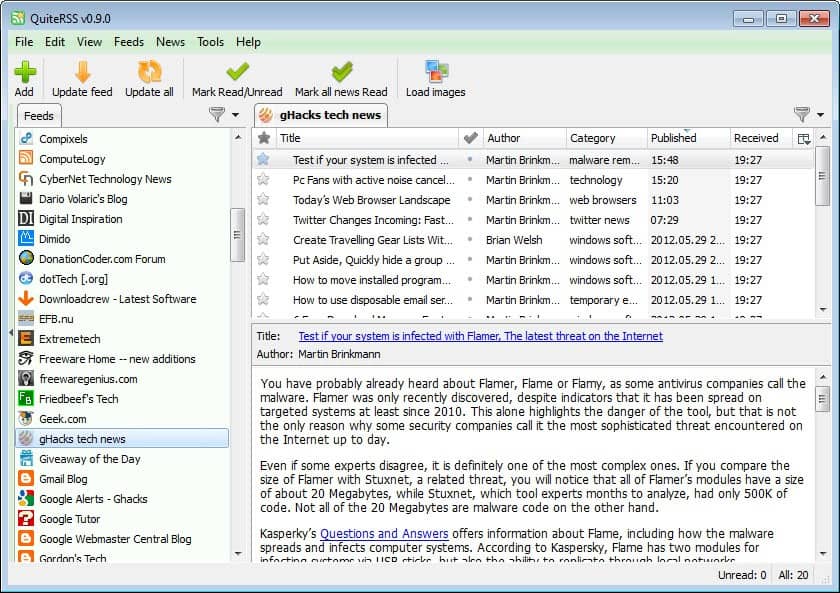
QuiteRSS is in many regards similar to Great News even though its feature set is limited in comparison. The core features, that is importing and exporting feed lists and single feeds, reading and updating feeds is available though.

quite rss

The interface itself is divided into three panes, which seems typical for many RSS readers. The left sidebar displays a list of subscribed feeds and their unread news count, the upper right pane the articles that were published on the selected RSS feed, and the lower right pane the article that is selected right now in the article listing.

The reader displays a basic version of the article at first. It is then possible to click-through to the website the news were published on, or display a rendered page in the feed reader directly. This needs to be enabled under Tools > Options > Browser > Use the embedded browser. QuiteRSS uses Webkit, the same technology that is powering Chrome and Safari for its embedded browser.

A handy button to load or block images is available right in the main toolbar, which can be useful in situations where images are not needed, or when the PC is connected to a slow Internet connection.

The only remaining options are audio notifications when new articles are available, keyboard shortcuts to handle all major features from the keyboard, the option to star items, and various options to modify the retrieval and display of feeds in the program.

If you are currently working with a different feed reader, you may have noticed that I have not mentioned some features that you may require. This includes options to create filters for words or phrases, the option to organize feeds in groups, options to discover new feeds or statistics. QuiteRSS is basic in this regard, which can be a issue if you need some or even all of the features it is missing.

It shines when it comes to performance and stability, even though its resource usage is a bit on the high side, especially when compared to GreatNews. Still, it has a clean interface that is really easy to use, and seems to be updated fairly often. Even if it lacks some of the features that you may need right now, it is a program to keep an eye on.

Two RSS Reader Alternatives For Windows
Desktop RSS Reader RSS Xpress
FeedDemon RSS News Reader
News Factory, Compact News Reader For Google Chrome
GTweet, Read Twitter RSS Feeds In Google Reader

Enjoyed the article?: Then sign-up for our free newsletter or RSS feed to kick off your day with the latest technology news and tips, or share the article with your friends and contacts on Facebook, Twitter or Google+ using the icons below.


About the Author:Martin Brinkmann is a journalist from Germany who founded Ghacks Technology News Back in 2005. He is passionate about all things tech and knows the Internet and computers like the back of his hand. You can follow Martin on Facebook or Twitter.Author: , Wednesday May 30, 2012 -
Tags:, ,

You are here: Home ? Software ? QuiteRSS, Open Source RSS Reader for Windows

View the original article here

2012年6月4日星期一

SkyDrive Desktop Apps Update, Exclusive Windows 8 Feature

Microsoft is currently rolling out a SkyDrive desktop apps update that supposedly will land on all systems running the application in the next week or so. These apps let you synchronize your local storage with the SkyDrive cloud space, and work pretty much like other desktop synchronizers. Probably the biggest difference in terms of functionality is SkyDrive’s Fetch File feature which makes available all data stored on a PC on the SkyDrive website, provided the PC is online at that time.

The update to SkyDrive 16.4.4111.0525 introduces several smaller changes, like improved updating speeds of contents, a file limit increase from 150000 to 10 million, and the removal of the SkyDrive app icon on OS X Lion systems. Mike Torres, Microsoft’s SkyDrive Apps Group Program Manager notes that there have also been many smaller bug fixes that improve the overall reliability of the service.

microsoft skydrive

More interesting than those improvements is a new exclusive Windows 8 that Mike mentions in the blog post.

SkyDrive for Windows desktop will power a cool new feature in the upcoming Windows 8 Release Preview, available the first week of June. Right from the Photos app in Windows 8, you can fetch photos stored on your other PCs that have SkyDrive installed – no matter where you are or how many terabytes of photos you have stored on the PC you are accessing. We’ll have more to say about this shortly, so stay tuned.

He basically states that Windows 8 users will be able to fetch photos from other PCs that have SkyDrive installed. The details are vague: Does the target system have to be online to fetch the photos from it? If that is the case, it would be similar to the fetch files feature that is already integrated into SkyDrive. The only benefit then would be an automatic integration of the photos into the photo app of Windows 8, hardly a feature to gloat about.

Another possible interpretation is that Windows 8 users do not need to have Skydrive installed to make use of the feature. This would obviously limit the availability to users who log into the system with their Windows Live / Microsoft Account ID.

It could also be that SkyDrive will automatically sync all photos on PCs with the cloud, but that seems highly unlikely, unless it is an optional feature that users need to activate in the application.

I guess we will find out in the coming days when Microsoft will reveal additional information about the new SkyDrive feature. The Windows 8 Release Preview will be available in the first week of June, and it will be interesting to see how the feature is implemented.

If you do not want to wait for the automatic update to update your version of SkyDrive to the latest one, you can simply go to the SkyDrive website and download the latest version for your operating system from there. Simply install the application on the system which will update it to the latest version.

Microsoft SkyDrive Feature Update
SkyDrive Get a link feature Now With Bitly Support
Microsoft SkyDrive Desktop Clients, Additional Storage Spotted
How To Access Files Remotely With Microsoft SkyDrive
Windows Live SkyDrive Explorer

Enjoyed the article?: Then sign-up for our free newsletter or RSS feed to kick off your day with the latest technology news and tips, or share the article with your friends and contacts on Facebook, Twitter or Google+ using the icons below.


About the Author:Martin Brinkmann is a journalist from Germany who founded Ghacks Technology News Back in 2005. He is passionate about all things tech and knows the Internet and computers like the back of his hand. You can follow Martin on Facebook or Twitter.Author: , Thursday May 31, 2012 -
Tags:, ,


Click on the following link(s) to read more about Microsoft

View the original article here

2012年6月3日星期日

Microsoft to defer revenue from Windows upgrade offer

(Reuters) - Microsoft Corp said it will defer the $450 million to $550 million of revenue it expects to generate this quarter from an offer to upgrade to its new Windows 8 operating system.

View the original article here

2012年6月2日星期六

How to find out when your version of Windows expires

Microsoft missed to mention the expiration date of the Windows 8 Release Preview that the company made available yesterday to developers and tech enthusiasts. This may not be an issue to some, for instance if the operating system is installed in a virtual machine or installed in a dual-boot environment as the second operating system. If you have however upgraded your current version of Windows to the Windows 8 Release Preview, you may want to know when the copy expires.

The why should be really obvious, as you need to find an alternative to switch to. This can be the final version of Windows 8 since it comes out later this year, another version of Windows, or even another operating system that is not Windows.

It is thankfully easy to check the expiration date of an operating system. Keep in mind that an expiration date will only be shown if there is one. If you run the command on a registered version of Windows 7 for instance, you will notice that no expiration date is shown. That’s because there is none.

windows 8 rp expiration date

If you are currently using an evaluation copy of Windows 8 do the following:

Tap on the Windows key to be taken to the Metro interface.Enter winver there and hit return.The screen that you see above should appear, highlighting that the installed copy is for evaluation purposes, and that it will expire on 16.01.2013

If you are using a previous version of Windows, use the Windows-r shortcut to open the runbox, enter winver, and tap on the enter key. You should see a similar looking screen.

Google Developing A Chrome Metro Version For Windows 8
Windows 7 Leaks Again
How To Run The Advanced Disk Cleanup Version In Windows
MOBZHunt, Find The Largest Folders On Your Windows System
Run Dreamscene in any version of Windows Vista

Enjoyed the article?: Then sign-up for our free newsletter or RSS feed to kick off your day with the latest technology news and tips, or share the article with your friends and contacts on Facebook, Twitter or Google+ using the icons below.


About the Author:Martin Brinkmann is a journalist from Germany who founded Ghacks Technology News Back in 2005. He is passionate about all things tech and knows the Internet and computers like the back of his hand. You can follow Martin on Facebook or Twitter.Author: , Friday June 1, 2012 -
Tags:,


View the original article here

2012年5月31日星期四

Windows 8′s Boot Experience Will Be Different

When there is something wrong with my Windows 7 desktop PC, I tend to hammer on the F8 key during boot to get into the advanced boot options. Here I can then repair or recover from issues that I may experience at that time. With Window s8, that process will be completely different. The main reason for this is the fast boot time of the operating system according to Microsoft. Or, more precisely, the interval that the operating system will recognize the F8 key.

Windows 8 users have 200ms to hit that key during boot. If they miss by one second, Windows 8 will skip the advanced boot menu and boot right into the operating system. To put this into perspective, users who type fast manage to hit four times the F8 key in a second, which results in individual key press intervals of 250ms. If you do not get the timing perfectly right, you will bypass the boot menu.

That’s obviously an issue that Windows 8 users will have to deal with, and Microsoft has decided to change the boot experience to reflect those changes.

Probably the biggest change is how the new boot menu is launched. While you can still press the F8 key frantically on boot, you may need multiple times to get the timing right.

When your in Windows 8, you have multiple options to configure the operating system to display the advanced boot menu on startup.

You can click open the Settings charm and load the PC settings here to configure the option. You reach the Settings charm for instance by moving the mouse in the lower right corner of the screen.

PC Settings

You can alternatively hold down the Shift key before you click on the system’s Restart option, or run the command shutdown /r /o for the same effect.

Microsoft furthermore has integrated automatic options to display the boot menu, for instance when errors are noted during boot, or when the operating system is running.

This in itself is a pretty big change, but that’s not all of it. The advanced boot menu has been redesigned completely, to match the Windows 8 theme.

Boot Options menu

Advanced options

Windows Startup Settings

As you can see, the menu looks completely different from the advanced boot menu in previous operating systems. From here you can reach the repair and recovery options, as well as configuration options. The menu is now divided into multiple screens, which veteran Windows users will have to get used to at first.

What’s your take on the new boot menu, and the options to load it? (via Everything Microsoft)

How To Manage The Windows 7 Boot Menu
Windows 8 Gets Hybrid Boot
Windows Boot Manager
Windows Boot Timer
Windows 8, Boot Security And Third Party Operating Systems

Enjoyed the article?: Then sign-up for our free newsletter or RSS feed to kick off your day with the latest technology news and tips, or share the article with your friends and contacts on Facebook, Twitter or Google+ using the icons below.


About the Author:Martin Brinkmann is a journalist from Germany who founded Ghacks Technology News Back in 2005. He is passionate about all things tech and knows the Internet and computers like the back of his hand. You can follow Martin on Facebook or Twitter.Author: , Tuesday May 22, 2012 -
Tags:, ,


Click on the following link(s) to read more about Windows

View the original article here

2012年5月30日星期三

Visual Studio 11: Only For Windows 7 or higher

Visual Studio 11: Only For Windows 7 or higher .download-info .download-button {background-image: url(http://cdn.ghacks.net/wp-content/plugins/download-monitor/page-addon/downloadbutton.gif);}.download-info .more-button {background-image: url(http://cdn.ghacks.net/wp-content/plugins/download-monitor/page-addon/morebutton.gif);}HomeWindowsLinuxSoftwareInternet ExplorerFirefoxChromeOperaEmailContactAdvertiseVisual Studio 11: Only For Windows 7 or higher

Windows 8 is not the only product that Microsoft is currently working on.? The company is also working on a refresh of their popular Visual Studio product lineup, and boy, there will be changes that will certainly irritate part of the user base that is currently working with the product.

Microsoft notes that Visual Studio 11 will only be available for Windows 7 or higher (which at the time of writing means Windows 8), and not for Vista, XP or other Windows operating systems.? According to the official announcement, this is due to the leveraging of core capabilities that only those operating systems offer. Microsoft unfortunately fails to mention what these core capabilities are.

The company notes further that the default target for applications will be set to .Net Framework 4.5 when it comes to managed apps, which means that those will run on Windows Vista or higher, and not on Windows XP or Windows Server 2003. If compatibility is an issue, developers can target new or existing applications to the .NET Framework 4.0 to ensure compatibility with those operating systems. I guess that is also official confirmation that the next iteration of the .Net Framework will not be compatible with Windows XP or Windows Server 2003.

But that is far from the only changes that will affect lots of Visual Studio users. Microsoft is a bit ambiguous in the blog post when it comes to Visual Studio 11 Express, and its support for desktop app development.

For example, the Express edition for Windows 8 allows developers to use C#, Visual Basic, C++ and JavaScript. It also provides best-in-class tools for creating Metro style apps for Windows 8, including tools such as Blend, app profiling, unit testing and more.

The Visual Studio 11 Express website on the other hand offers the following information that make it a lot clearer:

Visual Studio 11 Express for Windows 8 provides tools for Metro style app development. To create desktop apps, you need to use Visual Studio 11 Professional, or higher. In addition, Visual Studio 2010 Express products – Visual Basic 2010 Express, Visual C++ 2010 Express, and Visual C# 2010 Express – will remain available for free download.

This basically means that Windows 8 users who install Visual Studio 11 Express will only be able to develop Metro apps with it. And Windows 7 users? It is likely that they can continue developing desktop applications with the programming environment, as it would not really make much sense to only give them the option to create Metro apps – which they can’t test or use on the system – in Visual Studio Express 11.

Update: It seems that Windows 7 users won’t be able to use Visual Studio 11 Express at all, only Express for Web and Team Foundation Server Express.

Users who want to stick with Visual Studio when it comes to developing applications need to download and use the previous versions of the program which have been available for a while.

What’s your take on this?

Related Articles: Get your free copy of Microsoft Visual Studio 2005 Standard
Free Copies of Windows Server, SQL Server and Visual Studio 2008
Skype for Visual Studio
Microsoft Visual Studio 2010 RC Download
Microsoft Beta Day, Windows 8, .Net 4.5, Visual Studio 11

Enjoyed the article?: Then sign-up for our free newsletter or RSS feed to kick off your day with the latest technology news and tips, or share the article with your friends and contacts on Facebook, Twitter or Google+ using the icons below.