I switched from the Java-based RSS reader RSSOwl to GreatNews a few months ago and have not looked back. The main reason for the change was the Java dependency of RSSOwl, and not missing functionalities or other issues with the excellent news reader. GreatNews, a basic alternative, had no such dependencies so that I was able to uninstall Java from the system I’m working with.
QuiteRSS is in many regards similar to Great News even though its feature set is limited in comparison. The core features, that is importing and exporting feed lists and single feeds, reading and updating feeds is available though.
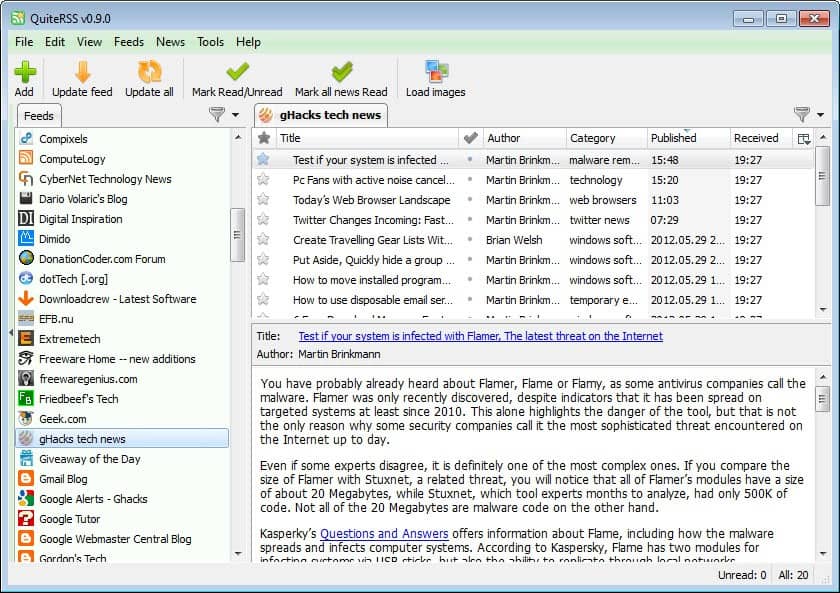
The interface itself is divided into three panes, which seems typical for many RSS readers. The left sidebar displays a list of subscribed feeds and their unread news count, the upper right pane the articles that were published on the selected RSS feed, and the lower right pane the article that is selected right now in the article listing.
The reader displays a basic version of the article at first. It is then possible to click-through to the website the news were published on, or display a rendered page in the feed reader directly. This needs to be enabled under Tools > Options > Browser > Use the embedded browser. QuiteRSS uses Webkit, the same technology that is powering Chrome and Safari for its embedded browser.
A handy button to load or block images is available right in the main toolbar, which can be useful in situations where images are not needed, or when the PC is connected to a slow Internet connection.
The only remaining options are audio notifications when new articles are available, keyboard shortcuts to handle all major features from the keyboard, the option to star items, and various options to modify the retrieval and display of feeds in the program.
If you are currently working with a different feed reader, you may have noticed that I have not mentioned some features that you may require. This includes options to create filters for words or phrases, the option to organize feeds in groups, options to discover new feeds or statistics. QuiteRSS is basic in this regard, which can be a issue if you need some or even all of the features it is missing.
It shines when it comes to performance and stability, even though its resource usage is a bit on the high side, especially when compared to GreatNews. Still, it has a clean interface that is really easy to use, and seems to be updated fairly often. Even if it lacks some of the features that you may need right now, it is a program to keep an eye on.
Two RSS Reader Alternatives For WindowsDesktop RSS Reader RSS Xpress
FeedDemon RSS News Reader
News Factory, Compact News Reader For Google Chrome
GTweet, Read Twitter RSS Feeds In Google Reader
Enjoyed the article?: Then sign-up for our free newsletter or RSS feed to kick off your day with the latest technology news and tips, or share the article with your friends and contacts on Facebook, Twitter or Google+ using the icons below.
About the Author:Martin Brinkmann is a journalist from Germany who founded Ghacks Technology News Back in 2005. He is passionate about all things tech and knows the Internet and computers like the back of his hand. You can follow Martin on Facebook or Twitter.Author: Martin Brinkmann, Wednesday May 30, 2012 -
Tags:rss, rss reader, windows software
You are here: Home ? Software ? QuiteRSS, Open Source RSS Reader for Windows


