If you have found Opera’s Unite feature particularly useful, you may be disappointed that the company decided to pull the plug on the technology and remove if from the browser in the near future. Opera Unite basically allows Opera users to run server apps in the web browser. Apps include file sharing, streaming media, a local web proxy, a web server or a photo sharing application.
With Opera Unite as good as gone, it is time to look at alternatives. Tonido, which I only discovered recently could prove to be a viable option in this regard. While not as flexible as Opera Unite in terms of offered applications and services, the service does come with a robust framework that is making available several core features that made Unite great.
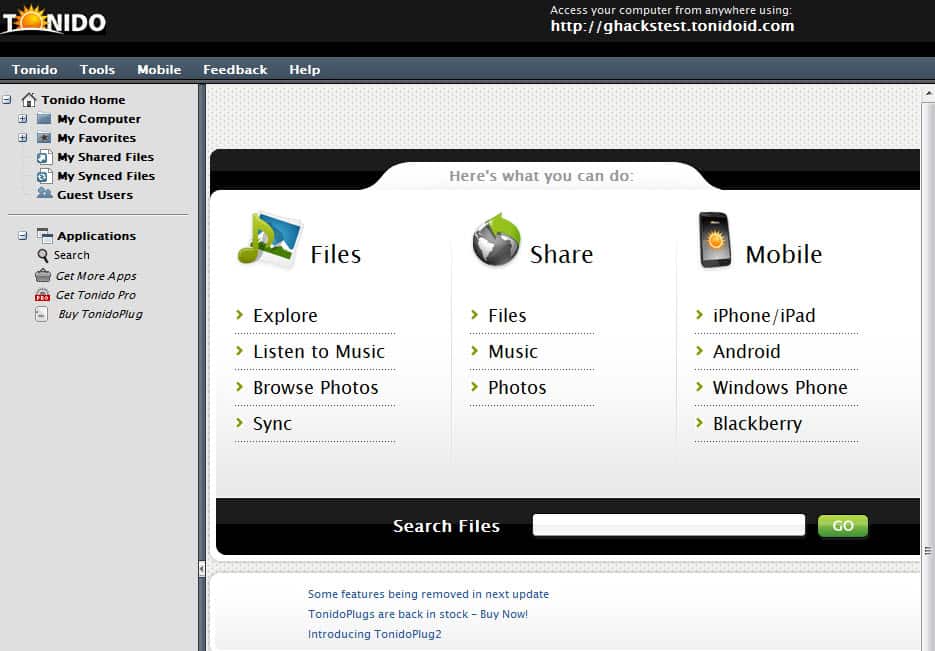
The core Tonido makes available local files on a local area network, the Internet and on mobile phones. In addition to that, the company has released several apps that extend the service’s feature beyond that. And this is where it gets interesting. The following applications are available to free users of Tonido:
Explorer – Installed by default. Lets you browser, upload and download files from anywhere. Also lets you listen to all music from a web browser.Search – Installed by default. Search a local system from the Internet.Sync – Installed by default. A cloud hosting service that you can use to synchronize files with the cloud. Free users are limited to 250 Megabytes of storage.Webshare – Installed by default. Share files by adding them to a special My Shared Files folder.Workspace – A browser-based Personal Information Manager similar to Microsoft Groove. Features include file sharing, to do lists, calendar and note apps, discussions, forum, chat and group collaboration.Thots – A personal blog or journal that you can access from anywhere. The emphasize here is private, which means that only you can access it, and not anyone else. You can however post stories on Twitter.Torrent – Use this app to start new torrent downloads from the Internet. You can download completed files from any location via http. Alternative: Remote uTorrent app, that allows you to control uTorrent downloads in the same way.Screenshare – Create a screenshot of your computer’s desktop and share it with colleagues or access it remotely with a browser.Backup – Backup files to remote computers running Tonido. Backups are protected with AES encryption and get transferred directly from one client PC to the other.Money – A personal financial manager that you can use to keep track of expenses, bank statements, stocks, and more.Tonidoshell – Access a computer’s command shell from a web browser.Fitness – A fitness tracking application.Additional applications are available for Pro users who pay a yearly fee to use the service.Pro users get access to advanced web sharing features, like password protection of shares, WebDAV mounting, guest accounts with file upload rights or document editing capabilities. They in addition get access to a DLNA Media Server for gaming systems like Microsoft’s Xbox 360 or Sony’s Playstation 3, and the ability to mount Tonido as a drive.
You may have noticed that Tonido shares some apps with Opera Unite, but that there are still many that it does not make available.
Tonido does have other things going for it though. It is available for multiple platforms, Windows, Linux and Mac, as well as all major mobile phone operating systems (Blackberry, iOS, Windows Phone and Android). You also get your own subdomain that you can connect to in a web browser of your choice to access files and apps remotely. Access is protected by a password, and I’d strongly suggest you pick a strong one to avoid unauthorized access to your files and apps.
No related posts.
Enjoyed the article?: Then sign-up for our free newsletter or RSS feed to kick off your day with the latest technology news and tips, or share the article with your friends and contacts on Facebook, Twitter or Google+ using the icons below.
About the Author:Martin Brinkmann is a journalist from Germany who founded Ghacks Technology News Back in 2005. He is passionate about all things tech and knows the Internet and computers like the back of his hand. You can follow Martin on Facebook or Twitter.Author: Martin Brinkmann, Thursday May 31, 2012 -
Tags:linux software, mac software, opera unite, windows software


